pi-share: encrypted links to files already on your disk
A Raspberry Pi and a link: the file leaves your disk and reaches only whoever holds the key
6 min read
The file is confidential, and too big for chat
This happens to me a lot, in two shapes. One is a work file for a client: confidential, and over the size limit of the chat app we use. The other is the folder for my accountant: scans, payslips, a tax return. It has to arrive intact, to one person, and a week later I have no reason to want it sitting anywhere.
Everyone knows the default move. Drag the file into Google Drive or WeTransfer, wait for the upload, send the link. It works. It also means the file now lives in a bucket that isn't mine, for as long as somebody else decides, and anyone who gets the link forwarded can open it.
pi-share is what I built instead: a self-hosted service that turns a file or folder on my disk into an end-to-end encrypted link. Nothing gets uploaded, nothing sits in third-party storage. I wrote it today, and it already runs on the Raspberry Pi 5 at my place.
You don't upload the file, you link it
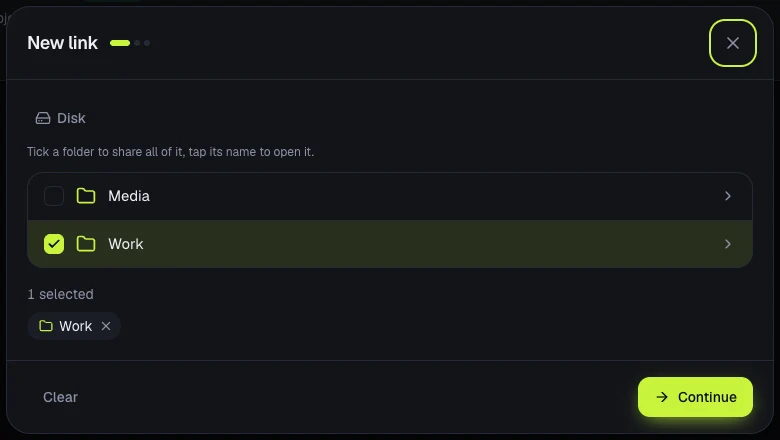
In the admin panel I browse the disk, tick a file or a folder and hit continue. Out comes a link. Nothing is copied anywhere: the bytes leave my machine only when the recipient downloads them.
 Full size
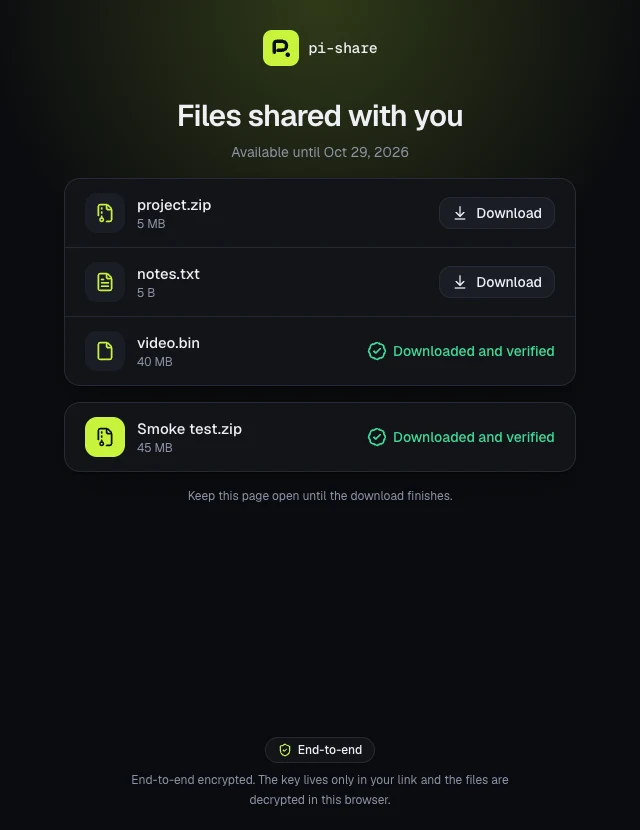
Size isn't a problem. Files stream off the disk, and the recipient can pull gigabytes without the browser holding them in memory. A folder shows up as a tree, and "download all" builds the zip on the fly.
There's one choice Drive never made me think about: what happens when the disk changes. I set it per link. Paused, the link stops until I've reviewed the list of added, removed and changed files and accepted it. Following, it tracks the disk like a shared folder. The accountant's link is always paused: if I drop the wrong document in that folder, it shouldn't reach them before I notice.
The key sits after the hash
A pi-share link looks like this:
https://share.example.com/d/<id>#<key>Everything after # is the fragment, and browsers never send it to the
server. Every link gets its own random 256-bit key, and that key exists in
exactly two places: the link I send, and the database on the Pi, sealed with a
master key.
The recipient's browser reads it from the fragment and decrypts the file names and sizes, then the files themselves, in 64 KiB records sealed with AES-256-GCM. Each record is verified. If something in the middle truncates, reorders or drops one, the download fails instead of handing over a broken file.
 Full size
In practice, Cloudflare, which runs the tunnel, sees ciphertext only, plus link ids and rough sizes. Never file names, keys or passwords. If I set a password, that stays in the browser too: what travels is a proof derived from the key, not the password. Someone who only knows the link id can't open it, doesn't show up in the log and can't lock it by guessing.
One week, one person, and I know when they opened it
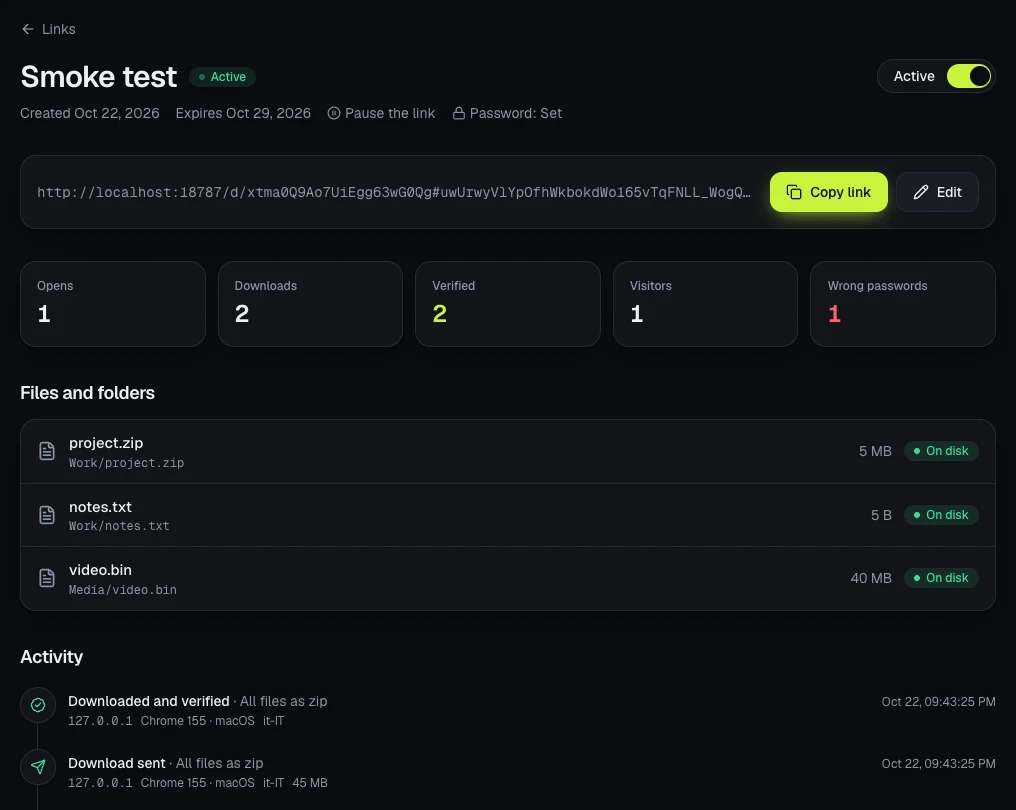
For the accountant I set three things: a password, sent over a different channel, a seven-day expiry and a limit of one person.
The limit counts people, not downloads. Whoever already downloaded can come back for the files as often as they like, and a cancelled download doesn't use up the slot. A second person opening the same forwarded link finds it exhausted. Ten wrong passwords and the link locks.
 Full size
Then there's the log, which is the part I use most. Opens, wrong passwords, downloads started, completed, interrupted and verified, each with time, IP, country, browser and OS. The previews chat apps fetch when you paste a link are logged separately, so I don't mistake Slack's unfurler for a human. When someone tells me "nothing came through", I don't have to ask whether they checked spam. I already know if they opened it.
On a Pi 5, behind a Cloudflare Tunnel
My setup is a Raspberry Pi 5 running Docker and a Cloudflare Tunnel. The README has the full quick start. Here are the three things that matter while you install it.
There are three processes, and only one faces the internet. The edge serves
the public page and has no disk, no database and no network. In Docker it runs
with network_mode: none and only talks to the broker over a unix socket. The
broker reads the disk read-only and re-checks every request. The admin stays on
the LAN, behind a password.
The tunnel points at a socket, not a port. Nothing opens on the router; the
Pi dials out to Cloudflare. In cloudflared's config.yml this is all it
takes:
ingress:
  - hostname: share.example.com
    service: unix:/run/pi-share/edge/edge.sock
  - service: http_status:404
/run is wiped on every boot. The socket folders live there, so after the
first reboot they're gone and the tunnel has nothing to connect to. One line per
folder in /etc/tmpfiles.d/pi-share.conf fixes it for good:
d /run/pi-share/broker 0750 10001 10001 -
d /run/pi-share/edge 0750 10001 10001 -
Images for amd64 and arm64 are on ghcr.io, so nothing gets compiled on the
Pi. And back up the data folder: it holds the master key, and without it the
links you already sent won't open.
What it doesn't do
- It doesn't hide sizes. Anyone watching the encrypted stream can tell how big the file is, even without knowing what's in it.
- It doesn't protect you from root on the Pi. It guards data in transit and at the edge, not from whoever owns the machine.
- It isn't faster than your upload. The bottleneck is nearly always the tunnel or your home connection's upstream, not the Pi.
- It doesn't have to stay on. A switch takes the public page offline, and it can turn itself off when no link is active.
You'll want this the next time you're about to drag a confidential PDF into Drive just to get it to one person. If there's a Pi in a drawer somewhere, installing it is seven commands plus the tunnel config. The code is on GitHub under MIT. The other half of my self-hosting lives on my phone, and it's Coolify Manager.
Got a project in mind?
I have been building software for companies and startups since 2018. If your product needs a hand, write to me. Worst case, you walk away with a free opinion.
Let's talkRead next

Haiku 5.5 beats Sonnet 5: time to rewrite your agent files
The small model that overtook the mid-size one
6 min read
You are paying an LLM to do an if
Code where there is one right answer, reasoning where there is not: the diagram nobody draws anymore
7 min read