The mobile companion Coolify was missing
Applications, deploys and logs in one app: the self-hosted server stops demanding a desk
5 min read
The container is down and you are nowhere near your laptop
Saturday afternoon, standing in a checkout line. The uptime notification lands: a service stopped answering. I have my phone. My laptop is at home.
Two options from there, both bad. Open Coolify's web UI in the phone browser: it is a dashboard built for a wide screen, and on mobile it turns into pinch and pan until you finally hit the right button. Or open an SSH session from a mobile client and type commands on a glass keyboard, with no shell history and a cursor that lands wherever it feels like.
Here is the thing. I did not need a terminal. I needed two things: see the status and hit restart. That covers about ninety percent of the times I look at a server from my phone.
Coolify Manager starts there: those two things in three taps, with the rest of the panel behind them. It is free, open source, and it ships today.
The browser extension was not enough
On January 29 I shipped coolify-manager-extension, a Chrome extension that does roughly the same job inside a popup. It works. I still use it.
But an extension assumes Chrome is open, and Chrome being open assumes a laptop in front of you. That is the exact situation where the problem does not exist. If I have the laptop, I already have the terminal and the real dashboard.
I figured that out the day after publishing it. Two days later version 1.0.0 of the app was out, carrying the same features to where they are actually needed.
Three taps instead of an SSH session
You wire it up once, and nothing lands on the server. In Coolify, open
Settings → Advanced → API Access, turn it on, and create a token with read,
write and deploy scopes. In the app, go to settings, paste the URL and the
token, hit "Test connection", save.
If the test fails and you cannot tell why, run the same call from your terminal before blaming the app:
curl -H "Authorization: Bearer $COOLIFY_TOKEN" \
  https://coolify.example.com/api/v1/applications
If that curl does not hand you JSON, the phone is not the problem. It is the
token, the URL, or API Access still switched off.
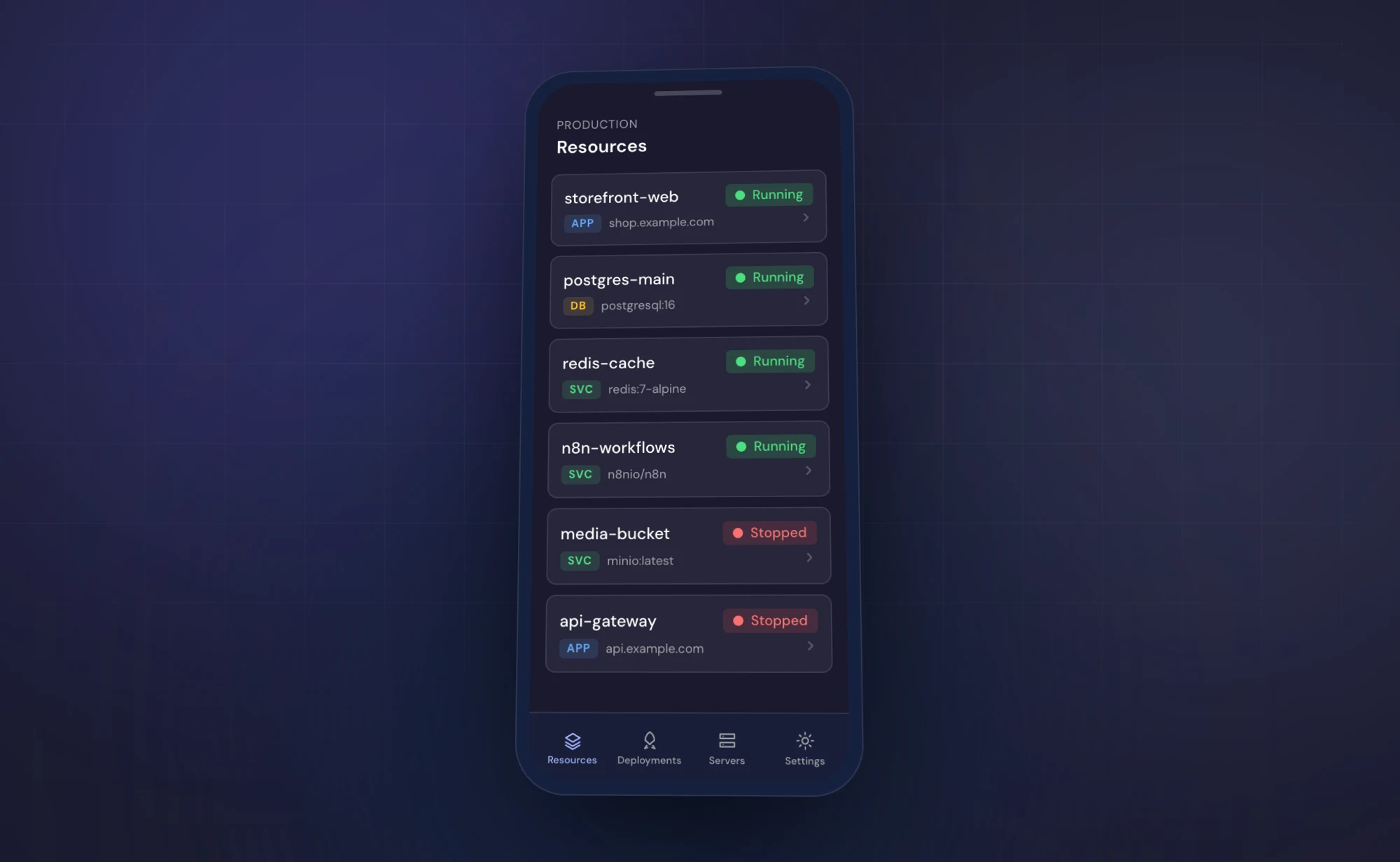
Then the list fills in. Every application shows status, FQDN and the repository it came from, which is enough to tell in three seconds what went down. The card carries start, stop, restart and deploy, one tap each. The detail view streams the logs. The Deployments tab lists the deploys running right now with commit hash and message, so when something is red you also know what turned it red.
There is no server of mine in the middle
It is the question I would ask before pasting a token with deploy rights into
some stranger's app: where does that token end up?
Nowhere. The app talks straight to your Coolify instance, cloud or self-hosted. No backend of mine, no proxy, no account to create. The entire persistence layer is these lines:
import * as SecureStore from "expo-secure-store";

export async function getApiToken(): Promise<string | null> {
  return SecureStore.getItemAsync(STORAGE_KEYS.API_TOKEN);
}

export async function setApiToken(token: string): Promise<void> {
  await SecureStore.setItemAsync(STORAGE_KEYS.API_TOKEN, token);
}
expo-secure-store writes to the Android Keystore, not to AsyncStorage and
not to a preferences file. No analytics, no ad SDKs, no telemetry. The license
is MIT, so if my word is not enough, that file is fifty lines and you can read
it yourself.
What it does not do
This is 1.0.0, and it shows.
- One instance at a time. Two Coolify servers means swapping the settings by hand for now.
- Applications only. Databases and services are not in the list yet.
- No App Store. On Android you get it from the Play Store or as an APK from the releases page. On iOS the source builds fine with Expo, but I have no public distribution channel.
- Deployments means "in flight". It is the tab for deploys running right now, not a history.
Update, August 2026
Six months in, this piece needs an update: the app passed a thousand downloads and went through three releases. I decided none of them on my own.
1.1.0, in February, added multiple instances. 1.2.0, in May, merged applications, databases and services into a single view, added a Servers tab with health status, and gave each application its own deployment history. Half of that list came out of issue #2, where a user pointed out that "Test connection" and "Save connection" were not the same thing, and that the history simply was not there. 1.3.0, in August, closed two reports: pulling the latest image for services (#4) and the fact that since Coolify 4.2.0 state actions want POST instead of GET (#6), which had broken the controls for anyone who upgraded their server. That one shipped the day after the report.
 Full size
The moment you install it is not today, while you are reading. It is the first Saturday you are out, the notification arrives, and you realize the only thing between you and a restart is a laptop you did not bring. The token takes two minutes to create, and those two minutes are better spent beforehand. The code lives on GitHub, and the rest of what I keep running is on the projects page.
Got a project in mind?
I have been building software for companies and startups since 2018. If your product needs a hand, write to me. Worst case, you walk away with a free opinion.
Let's talkRead next
brainless: agent terminals as React components
Claude Code, Codex and Grok taken apart into components: the terminal UI built for your Next.js projects
6 min read
DeepSeek V4-Flash instead of Opus: where it holds
Three weeks on the preview inside Claude Code, and this morning the 0731 weights under MIT
7 min read