brainless: agent terminals as React components
Claude Code, Codex and Grok taken apart into components: the terminal UI built for your Next.js projects
6 min read
Terminal UI on the web always goes the same wrong way
The moment is when you decide your product should feel like a terminal. A developer dashboard with a console inside it. A page that has to show an agent working. An internal tool that speaks the language of the people using it.
You open the editor and find three options. None of them is good.
The first is a PNG. Ten minutes of work, obsolete in two weeks. Change one label in the CLI and the image is now lying. It cannot be selected, cannot be found with Ctrl+F, cannot be read by a screen reader, and on a retina display it is either blurry or half a megabyte.
The second is xterm.js. It is a real terminal
emulator, which for this job is a cannon. You take on an ANSI parser, a buffer
model and a canvas, when what you wanted was a React component that looks like
Claude Code.
The third is building it yourself. That looks easy until you try. The right monospace stack. A caret that blinks at the right speed. A spinner that is not the usual wheel. The colors of a theme you stare at every day and could not name from memory. Two days later it is still "close enough".
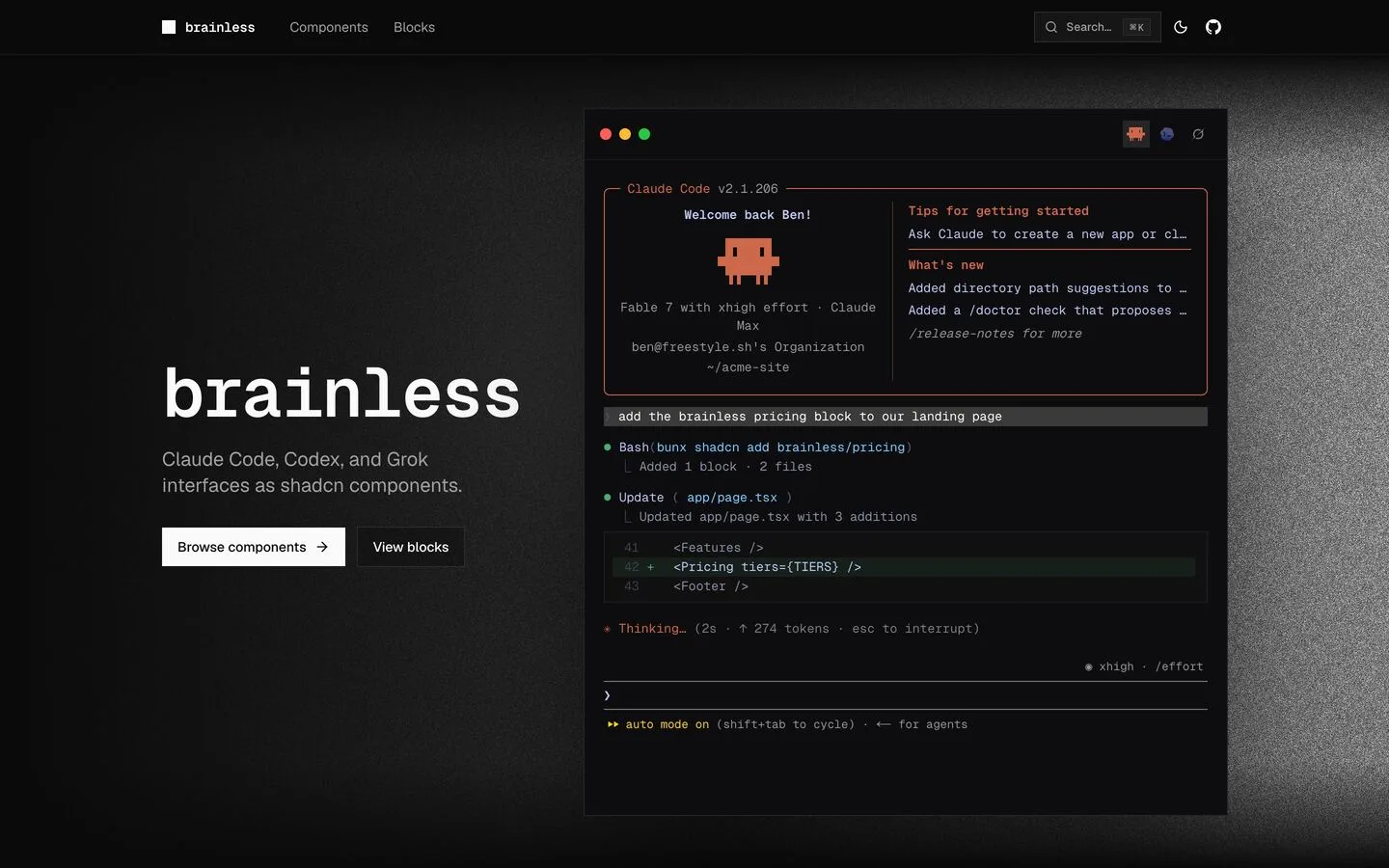
brainless is the fourth option, and the one I did not expect: the interfaces of Claude Code, Codex and Grok taken apart into React components and shipped as a shadcn registry. Forty items in total, thirty-four components and six assembled blocks, MIT licensed.
The resemblance is not eyeballed. The repository ships a harness under
tools/capture/ that drives the agents inside tmux and dumps frames as ANSI,
HTML and text, and the components are built against those captures.
 Full size
What I typed and what came back
I installed it in a scratch project, not in production. I wanted the real cost instead of the README.
The first command points the registry at your project. It is the standard shadcn mechanism, nothing specific to brainless:
npx shadcn@latest registry add @brainless=https://brainless.swerdlow.dev/r/{name}.jsonFrom there the @brainless namespace lives in your components.json next to
whatever else you use:
{
  "registries": {
    "@brainless": "https://brainless.swerdlow.dev/r/{name}.json"
  }
}
Then I asked for the biggest thing in there, a full Claude Code session:
npx shadcn@latest add @brainless/claude-session✔ Created 9 files:
- src/components/brainless/claude/claude-header.tsx
- src/components/brainless/claude/claude-message.tsx
- src/components/brainless/claude/claude-todo-list.tsx
- src/components/brainless/claude/claude-tool-call.tsx
- src/components/brainless/claude/claude-diff.tsx
- src/components/brainless/claude/claude-permission.tsx
- src/components/brainless/claude/claude-thinking.tsx
- src/components/brainless/claude/claude-prompt.tsx
- src/components/brainless/blocks/claude-session.tsx943 lines in total, and package.json did not move by a single line. No new
npm dependency: the files import React and your project's cn, and that is it.
My scratch project had its utils alias pointed at @/utils/cn instead of the
usual @/lib/utils, and the CLI rewrote every import to match without being
asked.
The block is the big piece, but you are not forced to take it. If all you need is Grok's message row, ask for that and one file lands:
npx shadcn@latest add @brainless/grok-messageThat is the practical difference from an npm-installed UI library. You are not pulling a catalog to use three pieces of it, you are asking for three pieces. It is the same reason the animated Lucide icons on this site arrived one at a time rather than all at once.
Of the nine files in the session, only three carry "use client": the prompt,
the thinking line and the permission panel, the three that actually own an input
or a timer. The other six stay Server Components and never reach the bundle.
The components ship WCAG-ready
This is not fake HTML that looks like a terminal. The right elements are underneath:
- Claude Code's header is a
<fieldset>with a<legend>, not a div with a::beforefaking the broken border; - a collapsed tool call is a real
<details>, so it opens with Enter and joins the tab order for free; - decorative glyphs are
aria-hidden; - the working line is a
role="status"witharia-live; - the text under the travelling highlight uses
background-clip: text, so it stays selectable text instead of becoming a picture.
And the animation stops on its own:
const GLYPHS = ["·", "✢", "✳", "✶", "✻", "✽", "✻", "✶", "✳", "✢"];

React.useEffect(() => {
  if (!running || prefersReduced) return;
  const id = setInterval(() => setGlyph((g) => (g + 1) % GLYPHS.length), 110);
  return () => clearInterval(id);
}, [running, prefersReduced]);
prefers-reduced-motion is not half-handled here: the setInterval never
starts, rather than spinning behind a frozen animation. And those 110
milliseconds are not a guess, they come from the captures.
It is your code, not a theme to fight
With a classic UI library, say MUI, customization is a negotiation. You write a
theme, discover a component reading a token you did not plan for, end up
specializing selectors or sprinkling sx everywhere, and every major release
reopens the argument. You are asking permission from code you do not own.
A shadcn registry flips that. The code lands inside your repository, in plain sight, and from that second it is yours like everything else: open it, change it, rename it, delete half of it. No version can move under your feet, because there is no version.
With brainless you see this immediately, because the colors are literal hex values sitting in the files:
const CLAUDE = "#cd694a"; // terracotta base
const HILITE = "#e79475"; // the highlight the wave carries
const DIM = "#7d7d7d";
I counted 61 of them across the session block, 28 distinct, and not one
var(--...). That tracks: the stated goal is fidelity to the real CLI, and a
color that follows your theme would stop being Claude Code's. If your product
wants the terminal feel in your own palette, those constants sit at the top of
each file, waiting to be changed.
The same goes for content, with one caveat worth knowing up front:
ClaudeSession is a canned screen, with no props and no children. It exists so
you can see the result in two minutes, not so you can build on it. Your own
session is composed from the individual pieces, which do take props:
<ClaudeHeader user="Andrea" cwd="~/dev/acme-app" model="Fable 5 · Claude Max" />

<ClaudeMessage role="user">add the pricing block to the landing page</ClaudeMessage>

<ClaudeToolCall
  tool="Bash"
  arg="bunx shadcn add brainless/pricing"
  result="Added 1 block · 2 files"
/>

<ClaudeThinking />
<ClaudePrompt mode="plan" effort="high" />
Where I would use it
On a personal project first. A more technical portfolio, aimed at technical people, where the homepage is not a hero with a photo but a session that says what you do in the language of the person reading it. Anyone arriving from a repository or a thread knows where they landed in the first second, without reading a line of copy.
Then in dashboards with an agent inside. If part of your product talks to a model and you are designing it as a chat with bubbles, you are telling the user it is a toy. A CLI says the opposite: there is a process underneath, with tools, permissions to grant and a diff to approve. brainless hands you that vocabulary already assembled, which puts your work back where it belongs, on making the agent actually work.
Got a project in mind?
I have been building software for companies and startups since 2018. If your product needs a hand, write to me. Worst case, you walk away with a free opinion.
Let's talkRead next

Haiku 5.5 beats Sonnet 5: time to rewrite your agent files
The small model that overtook the mid-size one
6 min read

Claude Opus 5.5 beats Fable 5.1 and costs less
Opus caching at Sonnet prices: a flagship cheaper than the one it replaces
6 min read