Archify: a diagram of the system you are about to change
An agent skill you install once: the diagram you would have drawn yourself, if you had the afternoon
5 min read
When you actually need a diagram
Not when someone asks for one. It is the Monday you open the repository and have to touch something big: a rework that runs through five files you did not write, a feature crossing the router, two APIs and a queue.
You know the individual pieces. What you do not have in your head is the map of how they fit together, and without it your estimates are guesses and you find the dependencies when something breaks.
Usually you do one of two things: open the files one by one and rebuild the map from memory, or draw it on paper you throw away that evening. Neither leaves you anything you can send to a colleague.
Install it once, then it is in every repository
Archify is an agent skill. You install it globally, with one command, and from then on it is available in whatever project you open.
npx skills add tt-a1i/archify -gIt works in Claude Code, Cursor, Codex CLI and opencode. There is no per-repo
setup: nothing to commit, nothing added to package.json, no dependency in
the project. It sits outside, like a command on your PATH.
Then you open the project you are working in and ask.
What you ask for, and what comes back
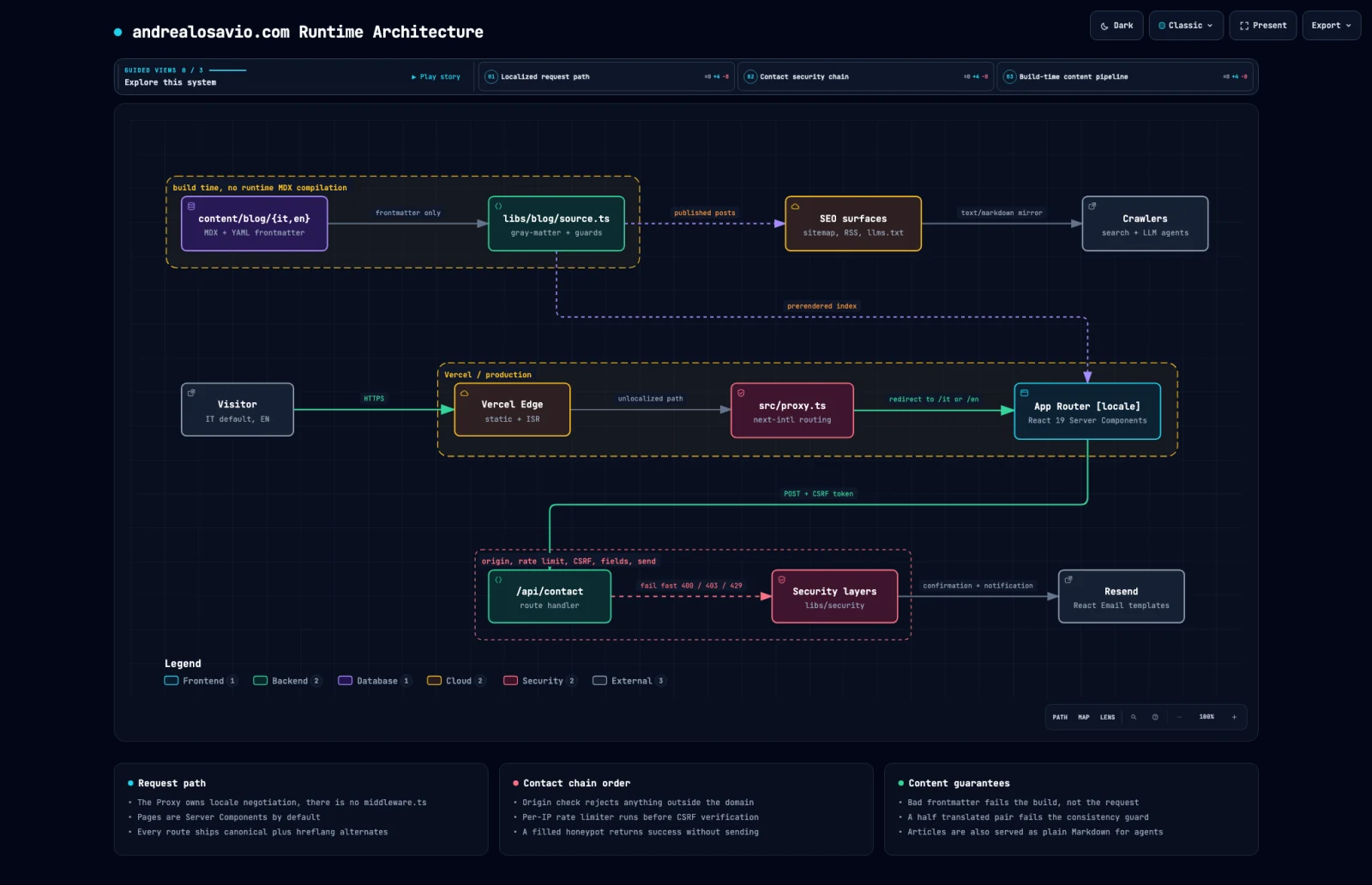
I asked it for this site, in plain words: map the runtime architecture, the bilingual App Router, the blog pipeline that only runs at build time, and the contact form flow with its security layers.
It read the code, picked eleven nodes and produced a single HTML file. From the first version to the good one took 222 seconds, and I wrote nothing in between: the agent writes the spec, as JSON, and a Node renderer compiles it locally. Your code never leaves the machine.
 Full size
If you do not have the repository handy it works anyway: describe the system in words and you get the same artifact.
It is not a picture, you move around inside it
This is the difference you feel in use. Double-click the HTML and the diagram answers back: click a node and see what it touches upstream and downstream, trace the path between two components, search by name, flip the theme.
I defined three chapters in it, one for the request path, one for the form's
security chain, one for the content pipeline. In presentation mode you step
through them with the keyboard and each chapter lights only the nodes you are
talking about. Every state has its own link. When someone on a call asks
where a value comes from, you send #route=source~seo instead of a cropped
screenshot.
It also tells you no
Which is why what comes out is something you can show without checking it first.
Before handing over the file, Archify checks it. The first round came back with thirteen errors, twelve of them the same mistake repeated.
Label "unlocalized path" overlaps component "edge"
  label rect: [376, 311, 87, 14]
  component "edge" rect: [246, 300, 136, 62]
I had left the nodes 74 pixels of clearance and the labels needed 87. That is not a taste argument. It is one rectangle inside another. Widening the grid took me to three errors, then to one. That last one I did not see coming.
{
  "code": "composition/desktop-readability",
  "viewBoxWidth": 1992,
  "text": "MDX + YAML frontmatter",
  "projectedFontPx": 4.2,
  "minimumProjectedNodeTextPx": 6
}
The diagram was correct. It was just 1992 pixels wide, and on a 1440 pixel laptop the node subtext would have landed at 4.2 pixels: unreadable, which means useless. I folded four columns into three rows and the fourth round passed.
Then the kicker: the final check, the one that actually opens the file in Chrome at four resolutions, rejected an artifact that had already passed all nine earlier checks. Reason: 49 pixels too tall at 1440x900. It did not fit one screen. A tool that only agrees with itself would never have said that.
When it is not the answer
- It does not convert your Mermaid. The agent reads it for topology, then writes everything fresh. There is no import button.
- The viewer controls are English or Simplified Chinese only. Your content stays in your language, the interface does not.
- Nodes that cite real files and lines need a public remote and a pinned commit, so an unpushed branch is out.
- It is not an editor. If you want to drag a box around with the mouse, this is the wrong tool: here you fix things by asking, in chat.
Where I actually open it
Three cases, all three already real.
Before a rework. I map the system as it is today, then ask for it as it
would be after the change I have in mind. compare puts the two side by side
and gives you the exact list of what was added, removed, moved. It is the design
conversation you normally have out loud, with something to look at.
When someone new joins. You give the tour of the system once and it stays a file. The next person starts from that instead of from you.
When you need to show that a feature touches more than it looks like. A diagram with the chain highlighted ends that argument in thirty seconds.
You do not need more than that to start: the install is one command, and the rest, from the schemas to the CLI, is already in the project README. Next time you open a rework on a part of the system you do not have in your head, try asking for the map before you open the first file. The one above covers this site's projects page too, and I generated it before writing a line of this article.
Got a project in mind?
I have been building software for companies and startups since 2018. If your product needs a hand, write to me. Worst case, you walk away with a free opinion.
Let's talkRead next

Haiku 5.5 beats Sonnet 5: time to rewrite your agent files
The small model that overtook the mid-size one
6 min read

You are paying an LLM to do an if
Code where there is one right answer, reasoning where there is not: the diagram nobody draws anymore
7 min read